


왜 처음에 30G 가 아니라 14G 였나
Ubuntu cloud image 는 설치 시 LV(Logical Volume)에 전체 PV 공간을 할당하지 않음. 기본 installer 가 루트 LV 를 디스크 크기와 무관하게 작게(보통 절반 이하)
잡아두고, 나머지는 VG 에 여유 공간으로 남겨둠. 그래서 디스크 30G → sda3 28G (PV) → LV 는 14G 만 잡힌 것.
→ 실제로는 30G 디스크 중 14G 만 쓰고 있었고, VG 에 남은 공간도 방치된 상태.
왜 Proxmox 에서 80G 로 늘려도 VM 안에선 그대로였나
Proxmox 의 "Resize" 는 가상 디스크(블록 디바이스) 크기만 늘림. VM 내부 입장에선 sda 가 커졌을 뿐, 그 위의 4개 계층은 자동으로 따라오지 않음.
sda (80G) ← Proxmox 가 늘려줌
└ sda3 (28G) ← 파티션 테이블은 그대로
└ PV (28G) ← LVM 물리 볼륨도 그대로
└ LV (14G) ← 논리 볼륨도 그대로
└ ext4 (14G) ← 파일시스템도 그대로
확장 4단계 (아래로 내려가며 순서대로)
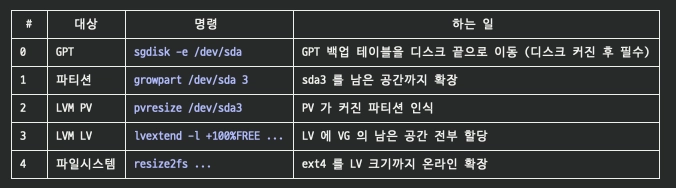
핵심 규칙: 디스크 확장은 항상 아래에서 위로 (디스크 → 파티션 → PV → LV → FS). 하나라도 빼먹으면 위쪽 계층은 예전 크기 그대로 보임.
다음에 또 늘릴 때
Proxmox 에서 디스크 resize 한 뒤, VM 안에서 이 4줄만 순서대로 실행하면 끝:
sudo sgdisk -e /dev/sda && sudo partprobe /dev/sda
sudo growpart /dev/sda 3
sudo pvresize /dev/sda3
sudo lvextend -l +100%FREE /dev/ubuntu-vg/ubuntu-lv
sudo resize2fs /dev/mapper/ubuntu--vg-ubuntu--lv
root@ves:/home/ves# sudo apt-get update && sudo apt-get install -y cloud-guest-utils gdisk
Hit:1 http://kr.archive.ubuntu.com/ubuntu jammy InRelease
Get:2 http://kr.archive.ubuntu.com/ubuntu jammy-updates InRelease [128 kB]
Get:3 http://kr.archive.ubuntu.com/ubuntu jammy-backports InRelease [127 kB]
Get:4 http://kr.archive.ubuntu.com/ubuntu jammy-updates/main amd64 Packages [3435 kB]
Get:5 http://kr.archive.ubuntu.com/ubuntu jammy-updates/main amd64 c-n-f Metadata [19.6 kB]
Get:6 http://kr.archive.ubuntu.com/ubuntu jammy-updates/universe amd64 Packages [1268 kB]
Get:7 http://kr.archive.ubuntu.com/ubuntu jammy-updates/universe amd64 c-n-f Metadata [30.5 kB]
Get:8 https://download.docker.com/linux/ubuntu jammy InRelease [48.5 kB]
Get:9 http://security.ubuntu.com/ubuntu jammy-security InRelease [129 kB]
Get:10 http://security.ubuntu.com/ubuntu jammy-security/main amd64 Packages [3170 kB]
Get:11 http://security.ubuntu.com/ubuntu jammy-security/main Translation-en [448 kB]
Get:12 http://security.ubuntu.com/ubuntu jammy-security/main amd64 c-n-f Metadata [14.2 kB]
Get:13 http://security.ubuntu.com/ubuntu jammy-security/universe amd64 Packages [1029 kB]
Get:14 http://security.ubuntu.com/ubuntu jammy-security/universe Translation-en [226 kB]
Get:15 http://security.ubuntu.com/ubuntu jammy-security/universe amd64 c-n-f Metadata [22.9 kB]
Fetched 10.1 MB in 4s (2772 kB/s)
Reading package lists... Done
Reading package lists... Done
Building dependency tree... Done
Reading state information... Done
cloud-guest-utils is already the newest version (0.32-22-g45fe84a5-0ubuntu1).
cloud-guest-utils set to manually installed.
gdisk is already the newest version (1.0.8-4build1).
gdisk set to manually installed.
0 upgraded, 0 newly installed, 0 to remove and 82 not upgraded.
root@ves:/home/ves# sudo sgdisk -e /dev/sda
Warning: The kernel is still using the old partition table.
The new table will be used at the next reboot or after you
run partprobe(8) or kpartx(8)
The operation has completed successfully.
root@ves:/home/ves# sudo partprobe /dev/sda
root@ves:/home/ves# sudo growpart /dev/sda 3
CHANGED: partition=3 start=4198400 old: size=58714112 end=62912512 new: size=163573727 end=167772127
root@ves:/home/ves# lsblk
NAME MAJ:MIN RM SIZE RO TYPE MOUNTPOINTS
loop0 7:0 0 63.9M 1 loop /snap/core20/2318
loop1 7:1 0 87M 1 loop /snap/lxd/29351
loop2 7:2 0 91.7M 1 loop /snap/lxd/38800
loop3 7:3 0 49.3M 1 loop /snap/snapd/26865
loop4 7:4 0 63.8M 1 loop /snap/core20/2769
loop5 7:5 0 48.4M 1 loop /snap/snapd/26382
sda 8:0 0 80G 0 disk
├─sda1 8:1 0 1M 0 part
├─sda2 8:2 0 2G 0 part /boot
└─sda3 8:3 0 78G 0 part
└─ubuntu--vg-ubuntu--lv 253:0 0 14G 0 lvm /
sr0 11:0 1 2G 0 rom
root@ves:/home/ves# sudo pvresize /dev/sda3
Physical volume "/dev/sda3" changed
1 physical volume(s) resized or updated / 0 physical volume(s) not resized
root@ves:/home/ves# sudo lvextend -l +100%FREE /dev/ubuntu-vg/ubuntu-lv
Size of logical volume ubuntu-vg/ubuntu-lv changed from <14.00 GiB (3583 extents) to <78.00 GiB (19967 extents).
Logical volume ubuntu-vg/ubuntu-lv successfully resized.
root@ves:/home/ves# sudo resize2fs /dev/mapper/ubuntu--vg-ubuntu--lv
resize2fs 1.46.5 (30-Dec-2021)
Filesystem at /dev/mapper/ubuntu--vg-ubuntu--lv is mounted on /; on-line resizing required
old_desc_blocks = 2, new_desc_blocks = 10
The filesystem on /dev/mapper/ubuntu--vg-ubuntu--lv is now 20446208 (4k) blocks long.
root@ves:/home/ves# df -hT /
lsblk
Filesystem Type Size Used Avail Use% Mounted on
/dev/mapper/ubuntu--vg-ubuntu--lv ext4 77G 7.7G 66G 11% /
NAME MAJ:MIN RM SIZE RO TYPE MOUNTPOINTS
loop0 7:0 0 63.9M 1 loop /snap/core20/2318
loop1 7:1 0 87M 1 loop /snap/lxd/29351
loop2 7:2 0 91.7M 1 loop /snap/lxd/38800
loop3 7:3 0 49.3M 1 loop /snap/snapd/26865
loop4 7:4 0 63.8M 1 loop /snap/core20/2769
loop5 7:5 0 48.4M 1 loop /snap/snapd/26382
sda 8:0 0 80G 0 disk
├─sda1 8:1 0 1M 0 part
├─sda2 8:2 0 2G 0 part /boot
└─sda3 8:3 0 78G 0 part
└─ubuntu--vg-ubuntu--lv 253:0 0 78G 0 lvm /
sr0 11:0 1 2G 0 rom
root@ves:/home/ves#
Bash
복사
참고자료
